Apple Tahoe Liquid Glass Button
Apple Tahoe Liquid Glass Button
A high-fidelity Liquid Glass Button engineered for shadcn/ui and Tailwind CSS. It features a hyper-realistic glassmorphism engine driven by an inline WebP SVG displacement map (feDisplacementMap) and backdrop-filter refraction. It utilizes an isolated z-index lens layer to guarantee zero text-ghosting, while an intricate, multi-layered box-shadow stack handles dynamic light and dark reflections. Features fluid scale transforms, oklch color mix customization, and auto-scaling filters. Zero-dependency, fully accessible, and single-file portable.
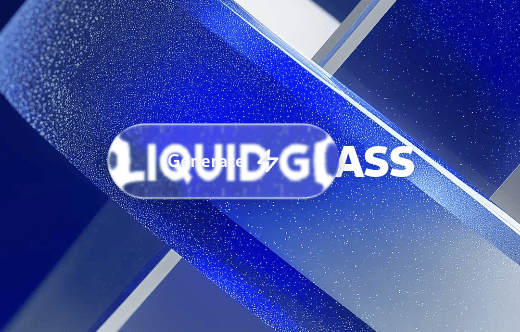
"use client";

import React, { useEffect, useRef, useState } from "react";
import { motion, useMotionValue, useSpring } from "framer-motion";
// 21st.dev sandbox: import { LiquidGlass, LiquidGlassButton } from "@/components/ui/apple-tahoe-liquid-glass-button";
import { LiquidGlass, LiquidGlassButton } from "@/components/ui/apple-tahoe-liquid-glass-button";

const ZapIcon = (props: React.SVGProps<SVGSVGElement>) => (
  <svg
    xmlns="http://www.w3.org/2000/svg"
    width="20"
    height="20"
    viewBox="0 0 24 24"
    fill="none"
    stroke="currentColor"
    strokeWidth="2.5"
    strokeLinecap="round"
    strokeLinejoin="round"
    {...props}
  >
    <polygon points="13 2 3 14 12 14 11 22 21 10 12 10 13 2" />
  </svg>
);

  const backgroundImages = [
    "https://cdn.21st.dev/assets/mirror/d5/d56de56c3f32850936a8d16e79073aa674066ed81f7b8370b363d85429c3f207.webp", // Original Apple Tahoe Scene
    "https://cdn.21st.dev/assets/mirror/b7/b7256668042183b1a11020a982f90d0ea2a79ab34a7404cd5854008983139d9e.webp", // Original Aave Labs Glass Scene
    "https://cdn.21st.dev/assets/mirror/4b/4bd1173e135b9637d1b7ce8d0c5d04a1177f2aae095dd3854368934903da8b65.jpg",
  ];

export default function GlassButtonDemo() {
  const containerRef = useRef<HTMLDivElement>(null);
  const buttonWrapperRef = useRef<HTMLDivElement>(null);
  const [bgIndex, setBgIndex] = useState(0);

  // Pointer position of the floating button, in container coordinates.
  const cursorX = useMotionValue(0);
  const cursorY = useMotionValue(0);
  const smoothX = useSpring(cursorX, { damping: 25, stiffness: 150, mass: 0.5 });
  const smoothY = useSpring(cursorY, { damping: 25, stiffness: 150, mass: 0.5 });

  useEffect(() => {
    const container = containerRef.current;
    const button = buttonWrapperRef.current;
    if (!container || !button) return;

    // Start centred.
    const c = container.getBoundingClientRect();
    const b = button.getBoundingClientRect();
    cursorX.set(c.width / 2 - b.width / 2);
    cursorY.set(c.height / 2 - b.height / 2);

    const handleMouseMove = (e: MouseEvent) => {
      const cr = container.getBoundingClientRect();
      const br = button.getBoundingClientRect();
      cursorX.set(e.clientX - cr.left - br.width / 2);
      cursorY.set(e.clientY - cr.top - br.height / 2);
    };

    window.addEventListener("mousemove", handleMouseMove);
    return () => window.removeEventListener("mousemove", handleMouseMove);
  }, [cursorX, cursorY]);

  return (
    <div
      ref={containerRef}
      onClick={() => setBgIndex((i) => (i + 1) % backgroundImages.length)}
      className="relative flex h-screen w-screen cursor-pointer select-none overflow-hidden bg-black"
    >
      {/* Backdrop: a plain element. Glass refracts whatever is painted behind it. */}
      <div
        className="absolute inset-0 bg-cover bg-center transition-[background-image] duration-500"
        style={{ backgroundImage: `url(${backgroundImages[bgIndex]})` }}
      />

      {/* Ordinary content. Glass placed on top of it refracts it. */}
      <div className="pointer-events-none absolute inset-0 flex flex-col items-center justify-center">
        <h1 className="text-4xl font-black tracking-tight text-white drop-shadow-sm md:text-7xl">
          LIQUID GLASS
        </h1>
      </div>

      {/* Surface glass: a fixed-position panel that refracts the scene behind it. */}
      <LiquidGlass
        material="clear"
        appearance="dark"
        refraction={32}
        bezel={32}
        blur={2}
        saturation={1.4}
        brightness={1.05}
        dispersion={0}
        fallbackBlur={10}
        mode="auto"
        interactive={false}
        motion="full"
        fluid={false}
        className="absolute bottom-8 left-8 max-w-xs p-6"
        onClick={(e) => e.stopPropagation()}
      >
        <div className="text-lg font-bold">Any surface</div>
        <p className="mt-1 text-sm">
          Cards, toolbars and panels refract the content behind them. No wrapper needed.
        </p>
      </LiquidGlass>

      {/* Floating button, follows the pointer. */}
      <motion.div
        ref={buttonWrapperRef}
        className="pointer-events-auto absolute left-0 top-0 z-10"
        style={{ x: smoothX, y: smoothY }}
      >
        <LiquidGlassButton interactive>
          <span>Generate</span>
          <ZapIcon className="h-5 w-5 fill-black/10" />
        </LiquidGlassButton>
      </motion.div>
    </div>
  );
}
Dependencies
License
MIT License